
- Home
- Solutions
- Sales Models
- Certificate Packs
- Accept a Quote
Accept a Quote
After completing your account registration, your account manager will create a quote for you. Follow the instructions below to accept the quote.
-
Log in to your Atlas↗ account.
-
From the dashboard, click on the View and Accept a Quote panel to open and review the available quote details.
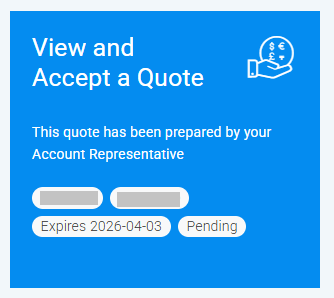
This block contains the following:
• Quote number
• Amount
• Expiration date
• Status -
From the Quote Summary page, review the quote and tick on the "I accept the quote..." box.
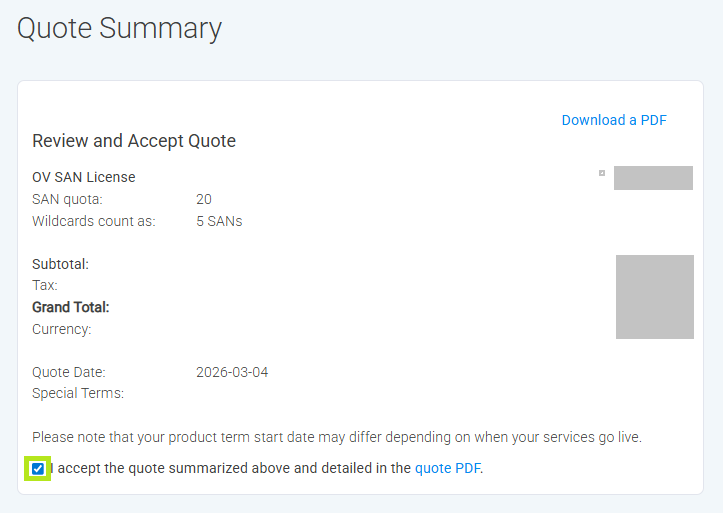
-
In the same page, select the payment method and tick on the "I confirm that I do not need to add a purchase order number..." box. Then, click on the Use this payment method button.
-
Review all selection and click on the Place your order button to complete.
-
You have successfully accepted the quote!
What's Next:
You may view certificate pack↗ or create an identity profile↗ for OV and EV orders.
For DV order, you can proceed on requesting and verifying your domain↗.
- Overview
- Sales Models
-
Services
-
Certificate Lifecycle Management (CLM)
- ACME
- TLS Connect
-
CAM
- Create Custom Active Directory Certificate Templates
- Create and Link a GPO in Active Directory
- Edit a GPO for Certificate Enrollment
- Check the Functional Levels in Active Directory
- Check the Active Directory Schema Version
- Test Connectivity and Permissions to Database Server
- Identify and Solve Clock Skew Problems with NTP
- LifeCycleX
- Digital Signing Service (DSS)
-
Certificate Lifecycle Management (CLM)
- Products
- Resellers